Ladder Challenge — 2026 Handout
Categories:
What is the Ladder Challenge?
Climb to the top of the singles ladder by challenging players ranked above you. Bouts are singles matches to 15 points. Win a challenge and you take your opponent’s rank; lose and you stay where you are.
Carrying over from 2025: Your starting rank for 2026 is your final 2025 rank. Members who never completed a 2025 bout were not carried over.
Not carrying over: Pending challenges, bout history, and rule timers from 2025 do not affect 2026 actions. Anything you had hanging at the end of last season is closed out.
Viewing the Ladder
Two ways in:
-
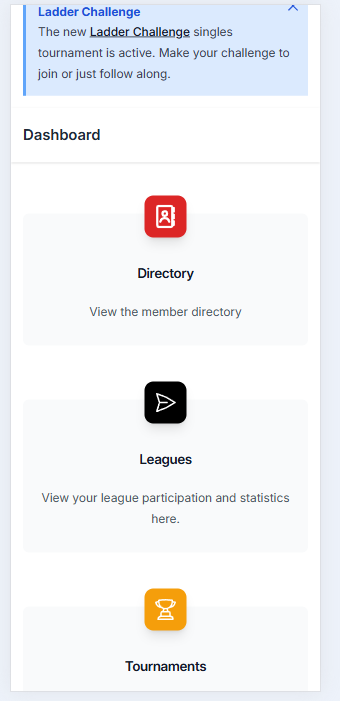
From the Dashboard → click the Ladder Challenge banner if it’s showing, or scroll to Tournaments.
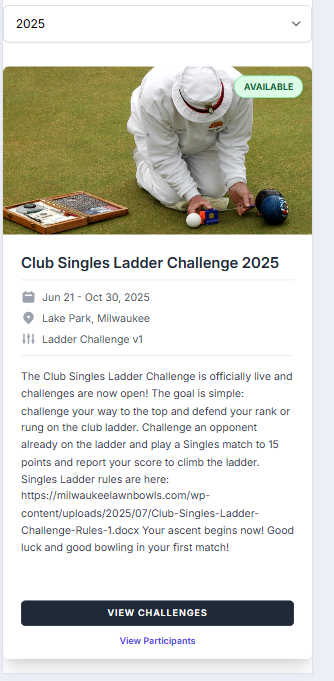
Then click View Challenges from the tournament information.
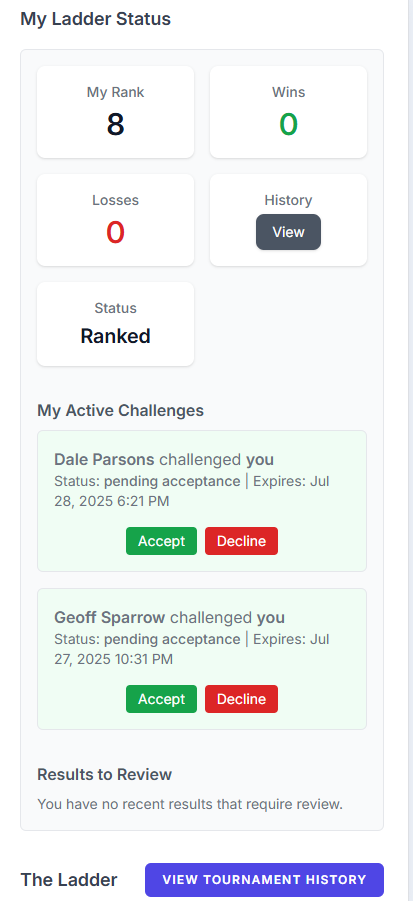
From here you’ll see all your activity (challenges, bouts, results) and the live ladder. Buttons to Challenge, Cancel, Accept, Report Results, or Dispute appear only when they’re available to you.
-
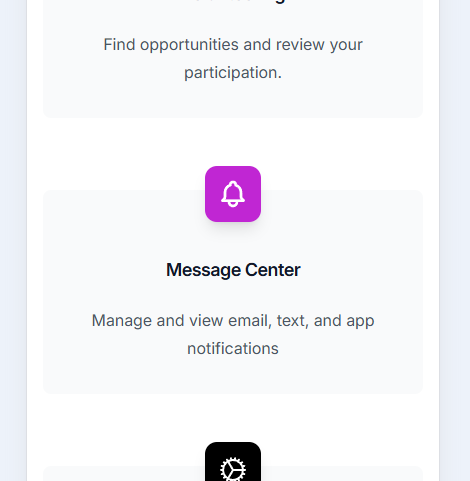
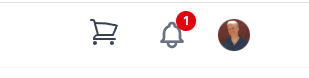
Via Notifications → the system emails you and posts in-app messages when something needs your attention (someone challenged you, your match was scheduled, a result is reported, your inactivity is approaching). To view them, scroll to Message Center on the dashboard, or click the notifications icon at the top upper right.
Select the My Notifications tab.
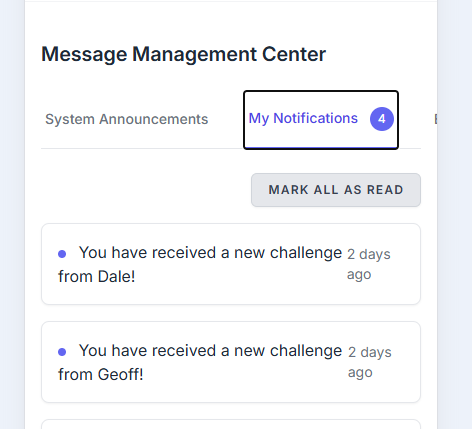
Click any notification to jump to the related action.
What is a Ranked Player?
If you’re in the Ladder Challenge, you’re ranked. Initial 2026 rankings carried forward from your end-of-2025 rank.
If you’re not in the ladder, you’re unranked — see Joining the Ladder below.
Making Challenges
As a ranked player
- View the ladder to see who you’re allowed to challenge — players within your challenge range (up to 4 positions above you).
- Pick an opponent and contact them (phone / text / in person) to agree on a date and time. Doing this outside the app first avoids declined or expired challenges.
- Click Challenge on that player in the app. They get an email and in-app notification. They have 3 days to accept or decline.
Once an in-range opponent has been challenged and accepted, you can play the match and then report the result. Once accepted you have 7 days to play and to report. Either player can enter the score from My Status (click the Report Result button); results are auto-confirmed. The opponent has 7 days to dispute the result for admin review.
Please report timely results. These often affect what challenges are available to other players.
Limits:
- You can have at most 2 active outgoing challenges at a time
- A player can have at most 3 pending incoming challenges
- Challenging an inactive player is “free” — it doesn’t count against your outgoing limit (their incoming limit still applies normally)
- While you have a match in progress (a challenge accepted but the result not yet recorded), you can’t issue or receive new challenges until you report it
- If you challenge up and lose, you must play one other bout before you can re-challenge that same opponent (a defender who loses is free to challenge back right away)
As an unranked player (you can join any time)
- View the ladder. You’ll see Challenge buttons only on players in the entry pool — the bottom third of active players (about 8 players at the moment, recalculated as the ladder changes size).
- Click Challenge on one. You join the ladder with status Joining.
- Win your first bout → you take the opponent’s rank + 1 (everyone below shifts down).
- Lose your first bout → you’re placed at the bottom of all ranked players.
Either way, you’re now ranked and can challenge upward like everyone else.
Vacation Hold (new this season)
Going out of town? Use My Status on your dashboard to mark yourself on vacation. While on hold:
- You won’t be demoted for inactivity
- Other players can challenge through you (within the standard challenge range)
- You can’t issue or receive new challenges
You get 1 free vacation hold per season. Subsequent holds incur a 1-rung demotion when you return.
Inactivity Rules
To keep the ladder active, players who go quiet are warned and eventually demoted:
- Day 7 of no activity → first warning email
- Day 18 (3 days before demotion) → imminent warning
- Day 21 → demoted 3 rungs and marked Inactive (System). Successive 21-day cycles demote 6, then 9, etc.
Any bout — won or lost — resets your inactivity clock. Vacation hold pauses it entirely.
Reporting & Disputes
Either player reports the score from the My Status tab — enter the final score for each side and optionally upload a scorecard image. The result is auto-confirmed.
Disputes are for incorrect results only. If you have actual evidence that the reported score is wrong (wrong winner, wrong score, wrong opponent), click Dispute within 7 days and an admin will review. If a result is reported correctly and you played that match, leave it alone.
Expired Challenges
If a challenged player doesn’t accept within 3 days, or an accepted challenge isn’t played and reported within 7 days of acceptance, the system marks it Expired automatically. Re-issue the challenge if you still want the match.
Quick Reference (2026 season)
| What | Setting |
|---|---|
| Challenge range (positions above you) | 4 |
| Entry pool for joiners | bottom third of active players |
| Response window (accept / decline) | 3 days |
| Scheduling/play window after accept | 7 days |
| Active outgoing challenges (max) | 2 |
| Pending incoming challenges (max) | 3 |
| Re-challenge same opponent after an up-challenge loss | after 1 other bout |
| New challenges while a match is in progress | not allowed until you report |
| Free vacation holds per season | 1 |
| Demotion per extra vacation hold | 1 rung |
| Dispute window after result | 7 days |
Questions?
Ask the Tournament Director, or post in the WhatsApp Singles Ladder chat.